
Reviewed and updated: October 30, 2026
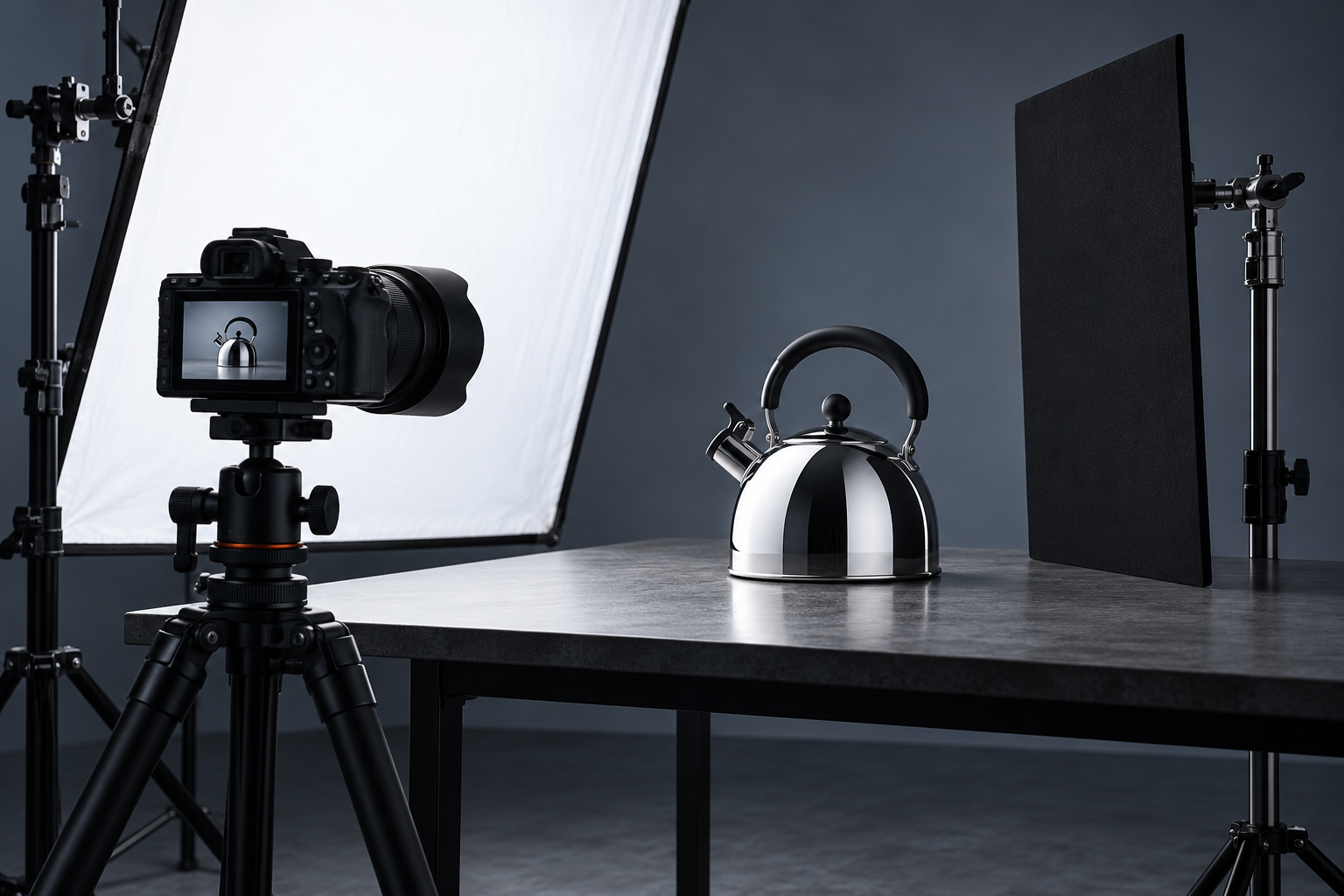
Photographing a polished kettle, a metal watch, or another reflective object often reveals more than the object itself. The camera, your hands, a bright window, and the room can all appear on its surface. Moving the camera slightly may remove one reflection while introducing another. The most useful starting point is to treat the reflected surroundings as part of the subject you are arranging.
You do not need to make every reflective surface look completely blank. Reflections can describe shape, texture, and finish. The aim is to remove distractions and control the reflection that explains the object. Start with a single object, a stable setup, and one broad light source so you can understand what each change does before adding more equipment.
Study the surface before setting the camera
Look at the object from the intended camera position. Notice whether it behaves like a flat mirror, a curved mirror, or a mixture of polished and textured areas. A curved surface can show a much wider part of the room than you expect. The background behind the object and the space beside the camera may both influence what appears on the metal.
Identify the most distracting reflected shapes. A bright doorway, a dark shirt, or a ceiling fixture may matter more than the camera itself. Turn or reposition the object slightly and watch how those shapes move. Keep a note of which direction improves the surface rather than making several changes at once and losing track of the useful adjustment.
Build a stable, simple working area
Place the object on a secure surface with enough room to move around it. Keep fragile items away from edges, and protect a surface that could be scratched by a heavy object. Use a tripod if the setup and available equipment make one appropriate. A stable camera position makes it easier to compare changes to the light and reflected surroundings.
Avoid balancing lights, mirrors, or boards precariously around the subject. Secure supports and keep cables out of walkways. Use lighting equipment according to its instructions, especially around heat, glass, and fabric. An uncluttered setup is easier to photograph and easier to adjust safely than a collection of improvised supports that must not be touched.
Start with one broad reflection
A large white surface near the object can create a broader, simpler reflection than a collection of small bright objects in the room. A suitable diffusion panel between an appropriate light source and the subject can also help control the appearance of the source. Keep all materials at safe distances required by the lighting equipment, and never cover a lamp or ventilation opening with an improvised sheet.
Move the white surface while watching the object through the camera. Try changing its angle, distance, and size in the frame of the reflection. You are looking for a shape that describes the curve of the object without swallowing important detail. Do not assume that bringing everything closer will always improve the result; compare one controlled change at a time.
Give the camera a quieter background
If the camera and operator remain obvious, examine what surrounds the lens from the object's point of view. A simple dark or light card positioned around, but clear of, the lens can sometimes reduce the visual clutter of the camera area. It will still reflect as a shape, so choose its appearance deliberately rather than expecting it to become invisible.
Keep the lens, camera ventilation, controls, and any moving parts unobstructed. Do not attach loose material where it can fall onto equipment or the subject. A timer or remote release, when supported by the camera, can let you step away for the exposure. Moving out of the reflection may be more effective than trying to hide a complicated outline while standing beside the camera.
Move the viewpoint before fighting the reflection
Raise, lower, or shift the camera a small amount while preserving a useful composition. The distracting reflection may move to a less important part of the surface or leave the visible area. Also try rotating the object slightly. With a product that has a logo, dial, or functional detail, check that the new angle still communicates the feature you intended to show.
Do not sacrifice the entire subject just to eliminate one small reflection. A kettle photographed from an extreme angle may become harder to understand than a clear view with a restrained reflection. Make a comparison frame from the original position, then evaluate the change at a useful viewing size rather than relying only on the small live-view image.
Preserve the shape with controlled contrast
An object surrounded by white can become flat-looking if its edges disappear into the background. A carefully positioned dark card may introduce a useful edge or gradient. Move it gradually and watch where the dark reflection falls. Its purpose is to describe the surface, not to create a black stripe through a detail that needs to remain visible.
Keep the treatment consistent across related objects if the photographs will form a set. A watch and its clasp, for example, should not appear to belong to completely different lighting environments unless that difference is intentional. Save a setup photograph or a simple diagram so you can return the cards and lights to approximately the same positions.
Expose for the detail you need to retain
Review the brightest important areas, using the camera's available exposure tools and the image itself. A small specular highlight may behave differently from a broad bright area containing useful texture. Avoid assuming that every bright spot must be darkened until it becomes gray. Choose an exposure that preserves the information needed for the subject and the intended output.
If the camera's automatic exposure keeps changing as you recompose, consider an appropriate manual or exposure-lock workflow supported by your camera. Our guide to exposure compensation explains how to make a deliberate adjustment when using an automatic mode. Recheck focus and camera stability after changing the viewpoint or the working distance.
Finish with cleaning and a comparison frame
Fingerprints, dust, and water marks become conspicuous when reflected light describes a polished surface. Clean the object only with methods suitable for its finish, and handle valuable or delicate items carefully. Keep cleaning products away from the camera. For the equipment itself, use the appropriate procedure rather than transferring a household cleaning method to a coated lens.
Take one final frame after checking the edges, important markings, background, and reflections. Compare it with the first frame and note which change made the biggest difference. If lens dust or marks interfere with the result, review our camera cleaning guide separately. A repeatable setup with intentional reflections is more useful than a complicated arrangement whose result you cannot reproduce.