
Reviewed and updated: October 31, 2026
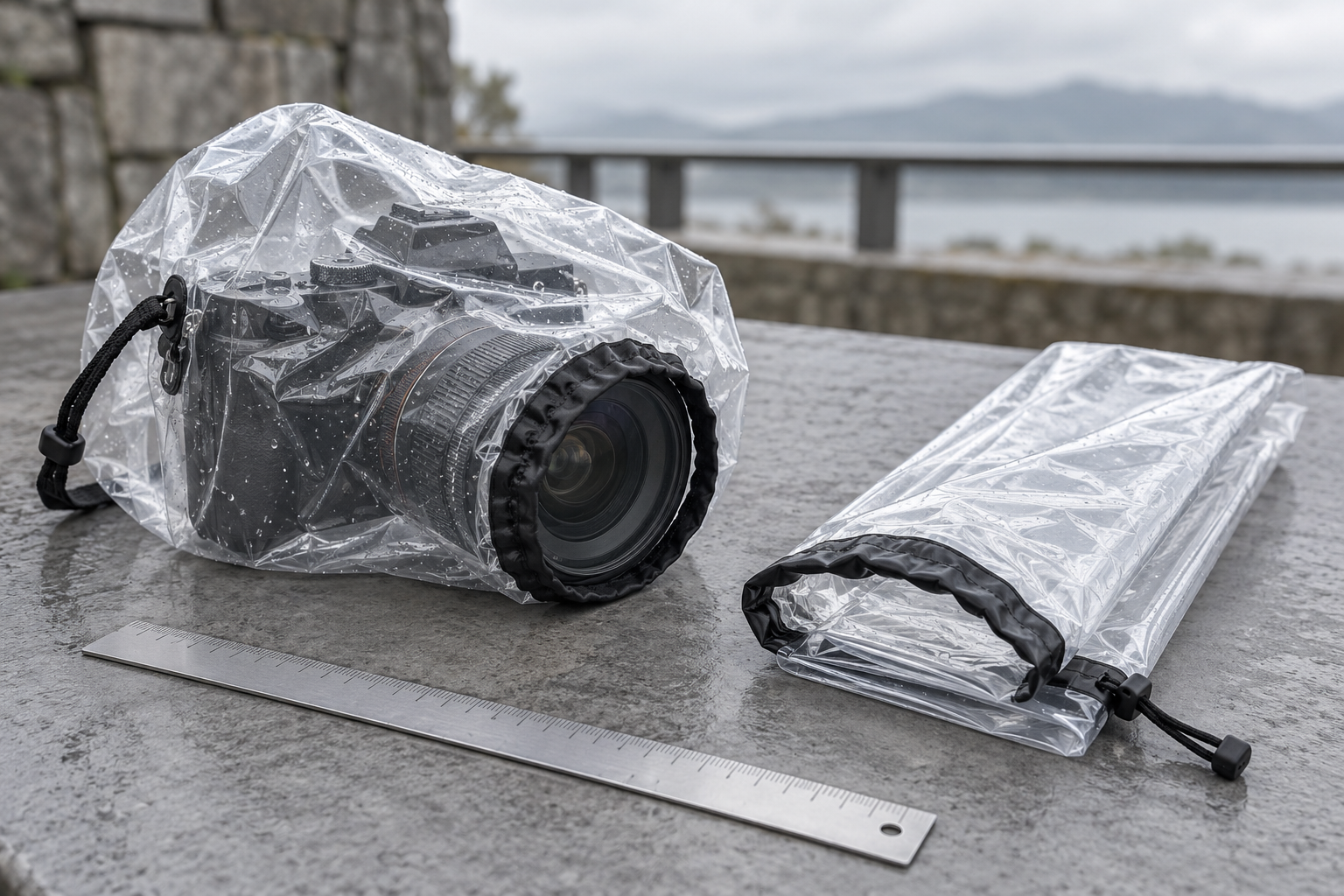
A camera rain sleeve should fit the equipment you use in the rain, including the lens at its working length. Choosing by camera brand alone misses the point. A compact mirrorless body with a short prime and the same body with a long zoom can need very different coverage. OP/TECH’s Small and Original Rainsleeves provide a useful example of how to compare fit before a trip.
Both are clear protective sleeves with a drawstring lens opening and a viewfinder opening. They are accessories for managing exposure to the elements, not underwater housings or a guarantee that any camera becomes waterproof. Start with your camera and lens instructions, then use the sleeve’s current dimensions to judge whether the setup is practical.
OP/TECH USA Rainsleeve Small 9001022
Specified for a camera and lens configuration up to 4.5 inches in diameter and 8 inches long. Compare the actual working configuration with those limits.
Check this model on Amazon: OP/TECH USA Rainsleeve Small 9001022 (paid link)
OP/TECH USA Rainsleeve Original 18 Inch 9001132
Specified for a camera and lens configuration up to 7 inches in diameter and 18 inches long. Rehearse control access and lens movement while the equipment is dry.
Check this model on Amazon: OP/TECH USA Rainsleeve Original 18 Inch 9001132 (paid link)
Measure the working configuration
Attach the lens you expect to use and note its length in the position that needs coverage. Include a lens hood if it will remain fitted. Check the widest relevant part of the setup too. A folded sleeve in a product photograph does not show whether your particular controls, viewfinder, or moving lens barrel will remain comfortable to operate.
Write those measurements down before opening a size selector. If you alternate between two lenses, measure both rather than assuming one sleeve will work equally well. A little spare material may be manageable, but a large loose cover can complicate handling. A sleeve that is too short cannot be made suitable simply by tightening its front opening.
Compare Small with Original
OP/TECH currently specifies the Small for a camera and lens configuration up to 4.5 inches in diameter and 8 inches long. The Original is specified up to 7 inches in diameter and 18 inches long. Those are the maker’s fit limits, not dimensions to estimate casually from a photograph of a similar camera.
The current product page describes two sleeves per package and supports handheld or tripod use. Check the actual selected variant and package before ordering because other sizes, including Flash and Mega, appear in the same range. Do not mistake a Small listing for a smaller package count or treat Original as a generic word that applies to every size.
Rehearse at home while everything is dry
Fit the sleeve according to its instructions before the weather becomes a problem. Find the eyepiece opening and check your view through it. Locate the shutter button, rear controls, and lens ring without looking away for a long time. You should understand the access points before you need to protect the camera in a changing situation.
Take several practice photographs indoors or under shelter. Review whether your fingers can reach the necessary controls and whether the sleeve catches as you move the camera. A dry rehearsal also reveals whether the selected size is awkward around a rotating screen or a projecting accessory. Resolve that before relying on the setup outside.
Allow for lens movement
An extending zoom lens can change length as you frame the shot. Check the complete range you expect to use, following the lens and sleeve guidance. Do not cinch a drawstring where it interferes with a moving part or forces the material into a control ring. If the combination cannot move freely, reconsider the fit.
A hood may help with stray droplets at the front, but it does not keep every surface dry. Check the lens front and your view between shots when conditions permit. Avoid repeatedly uncovering the camera to wipe it in exposed weather. Plan a sheltered place to pause and inspect the setup instead of improvising in the middle of a downpour.
Think through straps and support
Compare your normal carrying method with the manufacturer’s sleeve instructions. Know how the strap or tripod arrangement works before leaving home. A cover should not make you lose a secure grip on the camera or encourage you to balance it somewhere unstable while adjusting the plastic. Keep the equipment supported throughout fitting and removal.
If you use a tripod, practice moving from carrying to shooting with the empty sleeve already available. Check that the material is not trapped where the mount clamps or where a control needs to turn. Do not sacrifice a secure mount to make a cover seem easier to fit. The support system remains part of the safety and handling check.
Make an access plan for batteries and cards
Changing batteries or memory cards can expose openings that you were trying to protect. Begin with adequate power and storage, and avoid opening compartments in wet conditions. If a change becomes necessary, move to a suitable dry, sheltered place and follow the camera maker’s instructions. A clear sleeve does not create a dry service area around the camera.
Prepare batteries and cards before leaving shelter, then keep the camera closed during the shoot. The USB-C card-reader guide covers a separate part of the workflow afterward. Keep those tasks distinct from the decision about which sleeve fits the camera outside.
Treat conditions as a reason to stop
Monitor the actual situation rather than treating the cover as permission to keep shooting indefinitely. Wind, blowing sand, heavy rain, and slippery ground can affect the whole outing. If you cannot maintain a safe grip, see clearly, or reach shelter comfortably, put the camera away using the precautions its maker recommends and end the session.
Do not test the sleeve by spraying equipment with a hose or placing it under running water. Its usefulness should be judged through the intended fit and handling process, not a home experiment that puts the camera at risk. A manufacturer description of weather protection is not a specification for immersion, water pressure, or every possible exposure.
Inspect and dry after use
Remove the sleeve carefully in a suitable dry area so moisture on the outside does not fall onto the equipment. Follow the care directions for both items. Inspect the sleeve for tears or worn areas before reusing it, and let it dry as directed before storage. A wet folded cover can carry moisture back into the camera bag.
Temperature changes add another concern. Moving cold equipment into a warm room can require a deliberate transition routine. Our guide to protecting camera gear from condensation explains that separate problem. A rain sleeve may be part of the outdoor setup, but it should not replace the camera maker’s advice about moisture and temperature.
Choose the size from evidence
Before ordering, match the full OP/TECH product name, selected size, fit limits, and package description. Confirm that the result you open is the sleeve itself rather than an accessory or another size. The Small makes sense only when the measured configuration fits; the Original deserves the same check rather than an assumption that larger always means easier.
The best outcome is a cover you have already practiced fitting, can operate without strain, and can remove carefully afterward. Keep one simple record of the lens configuration and size that worked. That turns a rain-sleeve purchase into a repeatable preparation step rather than a last-minute guess when the first drops arrive.