
Best Cameras for Seniors: Comfortable, Clear Picks for 2026
There is no single “senior camera.” The right choice depends on grip comfort, vision, hand strength, hearing, experience, and the subjects a person enjoys. A bright viewfinder, readable menus, effective automatic modes, light lenses, and dependable autofocus often matter more than maximum resolution. These current models offer useful starting points, but a hands-on trial is the best test.
Our recommended shortlist
A light beginner-friendly mirrorless body with subject-detection autofocus, a vari-angle touchscreen, and straightforward automatic options.
A small EOS R starting point when you want a viewfinder and room to explore different lenses.
Find in Amazon (paid link)
A compact DX mirrorless camera with a pronounced grip, electronic viewfinder, subject detection, and a fully articulating screen.
A compact Nikon option when you enjoy a viewfinder and want lenses you can change as your interests grow.
Find in Amazon (paid link)
A small Micro Four Thirds body with in-body stabilization and compact lens choices for people who prioritize carrying comfort.
A small Micro Four Thirds direction when carrying comfort matters as much as interchangeable lenses.
Find in Amazon (paid link)
A current compact APS-C camera with in-body stabilization, strong subject-detection autofocus, and a viewfinder. Its smaller grip still deserves a hands-on check.
A compact APS-C hybrid direction when still photography and more involved video projects share your camera kit.
Find in Amazon (paid link)
A comfortable-grip APS-C body with stabilization, strong automatic options, and useful controls for someone who wants room to grow.
A hybrid option when a comfortable grip and both stills and video matter to your everyday camera.
Find in Amazon (paid link)
Start with the hands and eyes
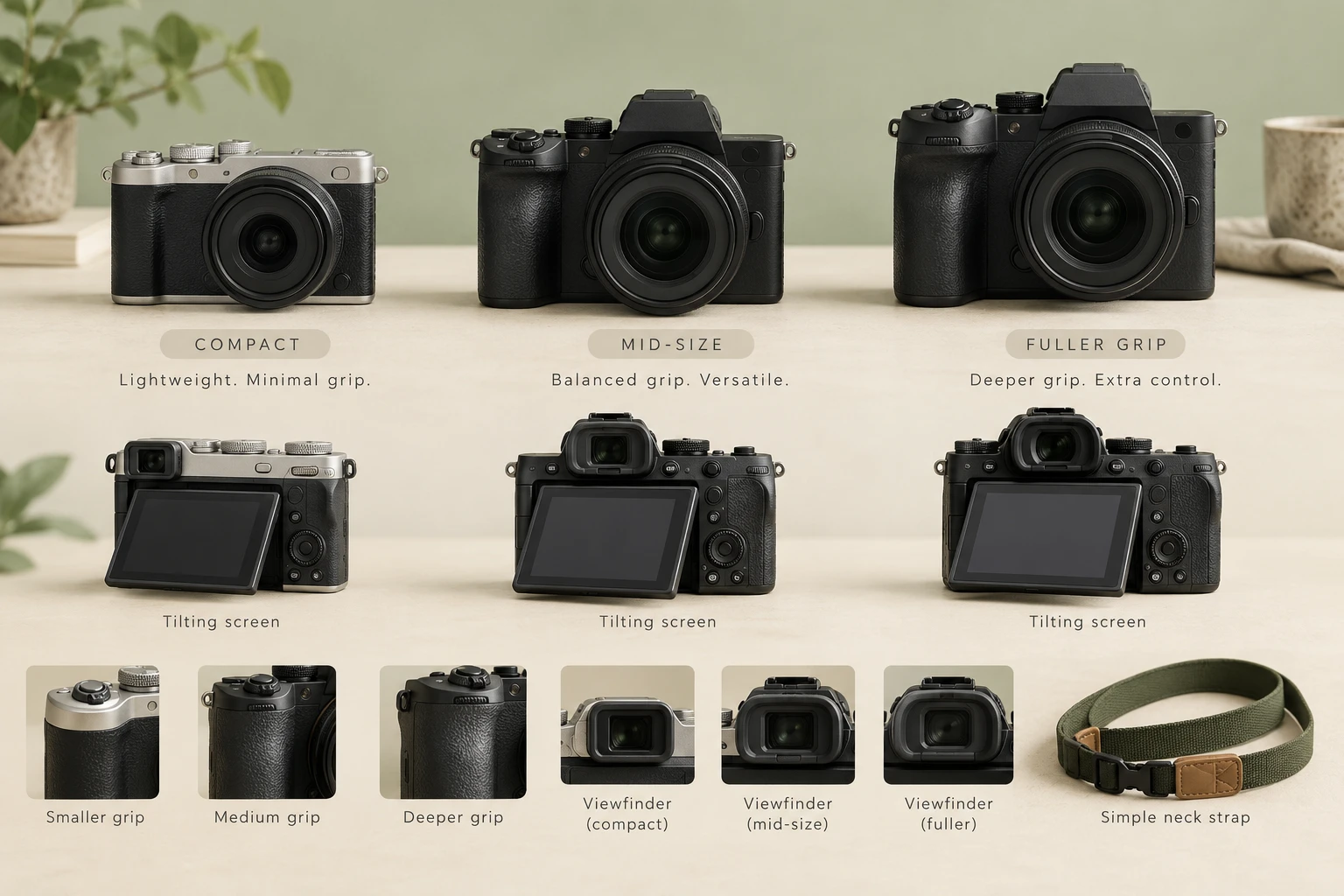
Try the grip with the intended lens attached. The shutter, zoom, playback, exposure compensation, and menu controls should be reachable without strain. Check the viewfinder diopter range with normal glasses and confirm that text can be enlarged or understood. A tilting screen can reduce bending, but a touchscreen alone may be frustrating for some users.
Keep the total kit light
Body weight is only part of the load. A large all-purpose zoom may make a compact camera front-heavy. Compare the complete working kit, including strap and spare battery. A small standard zoom plus one light prime can be easier than a single large lens. A broad comfortable strap or cross-body sling may improve security.
Look for dependable automatic help
Face and eye detection, subject recognition, auto ISO, stabilization, and scene-aware exposure can reduce missed pictures. They should remain understandable and easy to override. Save a simple custom setup if the camera permits it, and remove rarely used display information so the photographer sees only the controls needed for the day.
Consider charging and sharing
USB charging can be convenient, but some cameras cannot operate while charging and some require a specific cable or power source. Decide whether photographs will stay on a card, move to a computer, print directly, or transfer through a phone. Wireless pairing may require occasional troubleshooting, so test the complete routine before a trip.
Set up the camera together
Adjust the diopter, screen brightness, date, file format, auto power-off, focus area, button assignments, and strap. Add a high-quality memory card and label the charger. Practice taking, reviewing, protecting, and deleting a sample photograph. A one-page printed reminder can be more useful than sending someone back into the full manual.
How we evaluated the options
Our selection process starts with the photographer’s actual use: subject, lighting, carrying tolerance, existing lenses, and willingness to learn controls. We then compare the features that change the result in that use case, rather than counting every menu item. Image quality matters, but autofocus behavior, viewfinder comfort, control layout, battery planning, and lens availability often decide whether a camera remains enjoyable after the first week.
Verify the exact listing
Prices, bundles, firmware, and availability change. Treat the links in this guide as a way to compare current listings, then verify the manufacturer specification page, included accessories, warranty source, seller, and return policy. Marketplace titles can mix generations or mounts. The product box, model number, and mount marking should agree before the return window closes.
Write down the intended use before comparing listings. Include the subject, typical light, longest comfortable carrying time, and the feature that would solve the largest current frustration. This short note makes it easier to ignore attractive specifications that do not improve the photographs you actually want to make.
Plan a first-week test while the return period is open. Photograph a familiar indoor subject, an outdoor scene, a moving person or pet, and the closest subject the equipment is meant to handle. Review the files on a larger screen, repeat any weak result, and separate technique problems from equipment limits.
Keep the setup understandable. Add one accessory or control change at a time, label batteries and chargers, format cards only after files are backed up, and store the manual where it can be found. A dependable routine protects equipment and makes it much easier to notice when a new setting causes an unexpected result.
Write down the intended use before comparing listings. Include the subject, typical light, longest comfortable carrying time, and the feature that would solve the largest current frustration. This short note makes it easier to ignore attractive specifications that do not improve the photographs you actually want to make.
Plan a first-week test while the return period is open. Photograph a familiar indoor subject, an outdoor scene, a moving person or pet, and the closest subject the equipment is meant to handle. Review the files on a larger screen, repeat any weak result, and separate technique problems from equipment limits.
Keep the setup understandable. Add one accessory or control change at a time, label batteries and chargers, format cards only after files are backed up, and store the manual where it can be found. A dependable routine protects equipment and makes it much easier to notice when a new setting causes an unexpected result.
Write down the intended use before comparing listings. Include the subject, typical light, longest comfortable carrying time, and the feature that would solve the largest current frustration. This short note makes it easier to ignore attractive specifications that do not improve the photographs you actually want to make.
Plan a first-week test while the return period is open. Photograph a familiar indoor subject, an outdoor scene, a moving person or pet, and the closest subject the equipment is meant to handle. Review the files on a larger screen, repeat any weak result, and separate technique problems from equipment limits.
Keep the setup understandable. Add one accessory or control change at a time, label batteries and chargers, format cards only after files are backed up, and store the manual where it can be found. A dependable routine protects equipment and makes it much easier to notice when a new setting causes an unexpected result.
Final recommendation
Choose the simplest camera that remains enjoyable and capable for the person’s real subjects. A shop with a good return policy or a short rental lets the photographer evaluate comfort at home. The winning camera is the one the person can carry, understand, and trust without feeling rushed.
Affiliate disclosure: As an Amazon Associate, Digital Camera HQ may earn from qualifying purchases. Prices and availability change. Product links use the site tracking tag digitalcamera-hd-20.